
Included on every plan
HR analytics without AI judgment of your people
The Advanced Analytics module adds a dataset catalogue with permissions compiled into every query, a custom report builder, sanctioned cross-module joins, dashboards, trends and scheduled delivery. Every widget runs as the person looking at it, so a dashboard can narrow what someone sees and can never widen it. It is included on every plan at no extra charge.
- Counted on
- per employee, monthly.
- Published limits
- 5, taken from the module specification and printed in full below.
- Documented seams
- 2, to 2 other modules . Each one is optional, and absent rather than broken when the other is off.
- In the catalogue
- Running the HR function itself
- How you get it
- It is already included, on every plan and the free one too, at no extra charge. There is nothing to buy and nothing to switch on module by module. What every plan includes, and what is true of every module.
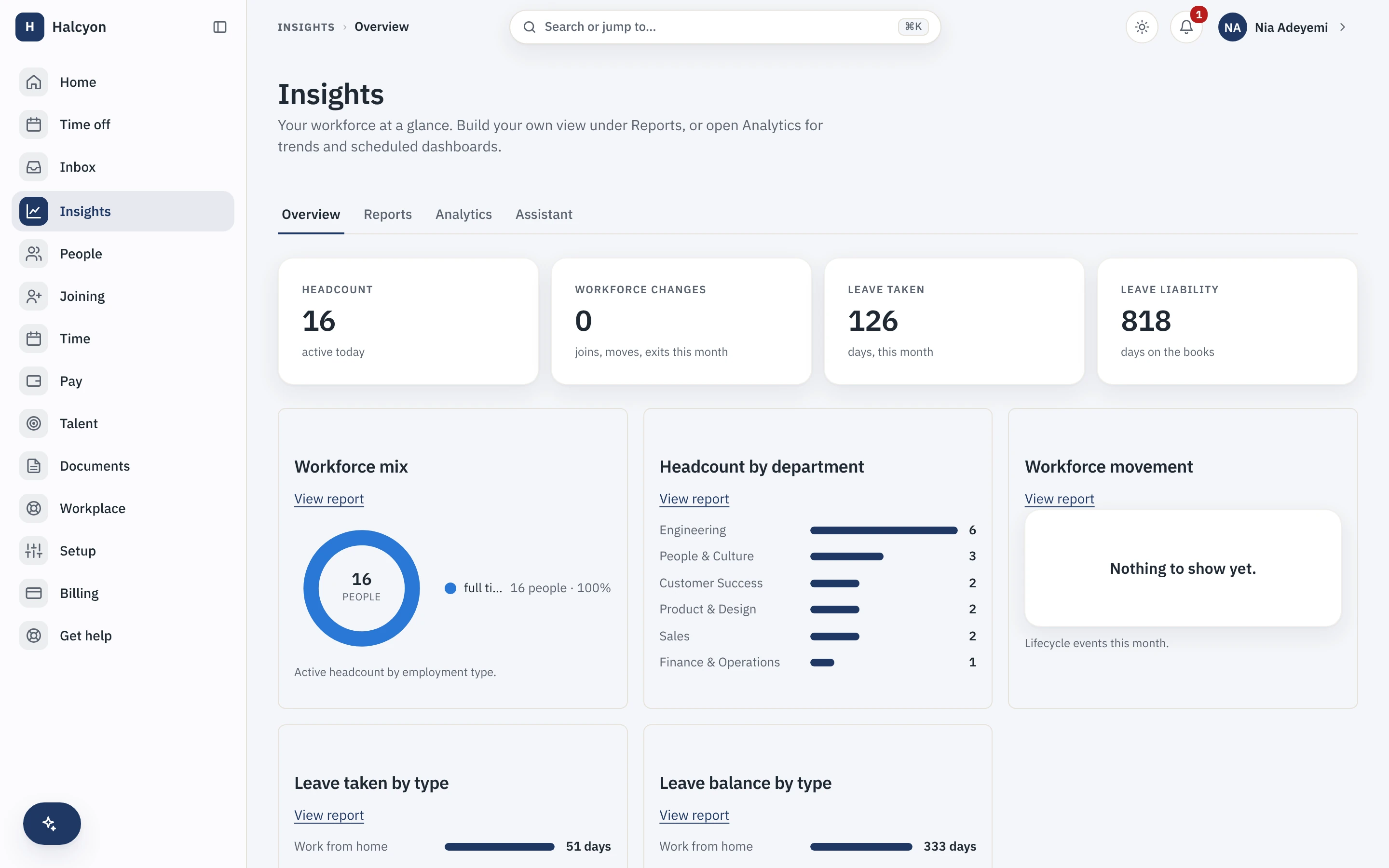
Advanced Analytics in the product
A real capture from the demo workspace, a global company with a team across the US, the UK and India. Not a mockup.
What Advanced Analytics does not do
Every module here publishes its non-goals, from its own specification. Boundaries you learn before buying are features; boundaries you learn after are refunds.
5 published for Advanced Analytics
-
No AI narratives, no automated insights and no predictive scoring of individuals: no attrition-risk flags, no performance predictions, no sentiment analysis.
-
It cannot widen anybody’s reach.
A composite inherits the gate of the module it reads from, so the survey minimum group size and the compensation bucketing survive every join.
-
It writes nothing.
Analytics is a read product and adds no path into another module’s data.
-
It is not an embedded third-party BI platform, and it blends in no external data.
-
It gives tenants no raw SQL access.
How it runs in practice
A people lead composes a headcount and attrition view from existing report sources, saves it to a dashboard and schedules it monthly. Each recipient’s copy is rendered against their own permissions, so one schedule can honestly tell two people different things, and a compensation figure stays a band-placement bucket for anyone without compensation clearance.
Where Advanced Analytics meets your other modules
Each of these is a boundary both specifications state, so it reads the same from either side. Every one is optional: with the other module off, the capability is absent rather than broken.
- Engagement
A joined report inherits the survey minimum group size, so a join can never widen it.
- Compensation & Equity
A joined report inherits compensation bucketing for anyone without compensation clearance.
Advanced Analytics questions
Who is Advanced Analytics for?
Companies that have outgrown the standard reports in the free core and want to compose their own: joining headcount to attrition to leave to hiring in one view, saving it, and having it arrive by email every month. The buyer is a people lead or a founder who is currently rebuilding the same spreadsheet each quarter. It is worth having once you have several modules running and questions that cross them. If your questions are answered by the core standard reports, which already export to CSV and can already be scheduled, you do not need this module yet.
Does analytics include AI-powered insights?
No. The module composes, aggregates and visualises; it ships no AI evaluation of people and no automated narrative. There is no attrition-risk score, no performance prediction and no sentiment analysis, and there never will be under the commitment recorded in our claims register. What you get instead is a dataset catalogue, a report builder over a closed vocabulary of dimensions and measures, sanctioned cross-module joins, dashboards, trends and scheduled delivery. The judgment stays yours.
What do I need in place before I can turn Advanced Analytics on, and how much setup is it?
Nothing to turn on: every module is included on every plan, the free one included, so a workspace already has this from the day it is created, on Free as much as on Growth. Beyond that there is almost nothing to configure: the dataset catalogue and its permission projection are provided rather than modelled by you, so the setup is composing the reports and dashboards you want and choosing who receives which schedule. What determines how useful it is on day one is which other modules you already run, because each one contributes its own datasets to the catalogue. Enabling analytics on a workspace using only the core gives you the core datasets and nothing more, which is worth knowing before you buy.
What does Advanced Analytics explicitly not do?
It ships no AI narratives, no automated insights and no predictive scoring of individuals. It cannot widen anybody’s reach: a composite report inherits the gate of the module it reads from, so the engagement survey minimum group size and the compensation bucketing survive every join. It writes nothing, because analytics is a read product and adds no path into another module’s data. It is not an embedded third-party business-intelligence platform, and it blends in no external data. And it gives you no raw SQL access to your workspace.
How does Advanced Analytics fit with the core and the other modules?
It reads them, under the viewer’s own permissions, and never around them. Every widget runs as the person looking at it rather than as the person who built it, so a shared dashboard can narrow what someone sees and can never widen it: one schedule can honestly tell two recipients different things, and a compensation figure stays a band-placement bucket for anyone without compensation clearance. Each module you enable contributes its datasets to the catalogue and its gates travel with them. It is worth being clear about what is not exclusive to this module: the core standard reports, their CSV export and scheduled delivery of them are part of the core on every plan. What this module adds is the custom builder, the cross-module joins and the dashboards.
What happens if I turn Advanced Analytics off?
The dataset catalogue, custom reports, dashboards and their schedules stop being reachable, and because the module is part of your plan there is no separate charge to stop. The core standard reports are unaffected, because they were never part of this module. Your saved report and dashboard definitions are retained on a schedule and restored if you re-enable within that window. Nothing about your underlying data changes, since analytics only ever read it: turning the module off removes a lens, not a record. A full workspace export is unaffected either way.
Advanced Analytics is included on every plan, the free one included.