
Included on every plan
Former employees who can still reach their own payslips and letters
The Alumni Access module keeps a former employee’s own payslips, tax documents, experience and relieving letters and settlement summary self-serve on their personal email, long after the work address is switched off, so the request queue every HR team carries after an exit simply stops arriving. It is included on every plan at no extra charge, and it costs the same whether twelve people have left or four hundred have, because alumni are not seats.
- Counted on
- flat, per workspace, monthly. One charge for the workspace whatever your headcount does, because the people it serves are not seats.
- Published limits
- 5, taken from the module specification and printed in full below.
- Documented seams
- None. It builds on the core and needs no other module switched on.
- In the catalogue
- After someone leaves
- How you get it
- It is already included, on every plan and the free one too, at no extra charge. There is nothing to buy and nothing to switch on module by module. What every plan includes, and what is true of every module.
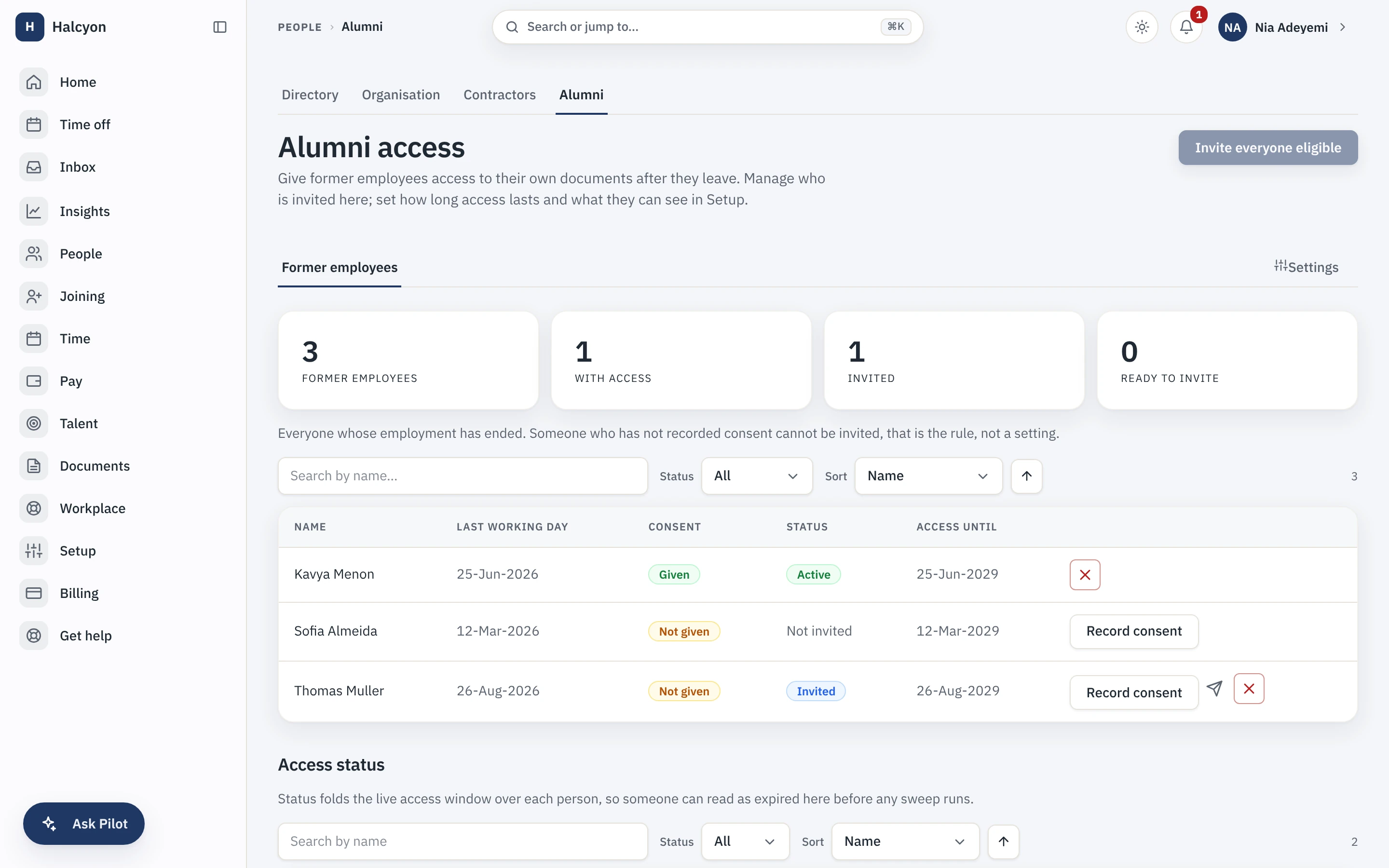
Alumni Access in the product
A real capture from the demo workspace, a global company with a team across the US, the UK and India. Not a mockup.
What Alumni Access does not do
Every module here publishes its non-goals, from its own specification. Boundaries you learn before buying are features; boundaries you learn after are refunds.
5 published for Alumni Access
-
It is not an alumni community.
No news feed, no jobs board, no referrals, no events. That is a different product and we have not built it.
-
A former employee cannot request a new document through it.
They reach the documents that already exist; the request workflow is recorded as a deferral rather than shipped and quietly disappointing.
-
It is not a single login across employers.
An alumni identity belongs to one workspace, like every other identity in Capstan, so a person who worked at two Capstan customers signs in twice.
-
It shows a former employee nothing but their own records.
Their own documents in the categories you have designated, their own settlement summary, their own contact details, and nothing else: no directory, no org chart, no module surface.
-
It does not outlive your own account.
If you leave Capstan, your export is the continuity answer for your alumni, not our servers.
How it runs in practice
An exit completes, and the offboarding checklist has already confirmed the person’s personal email and recorded their consent. An invitation goes to that address; the first sign-in is a one-time code rather than a password, and it creates their alumni profile. Two years later they need Form 16 and a relieving letter for a background check, and they download both themselves, at eleven at night, from an account nobody here had to reopen. Your admin can set the access window to a fixed number of years from the last working day or leave it open, and can revoke one person with a reason that is audited.
Where Alumni Access meets your other modules
Alumni Access has no documented seam with another module. It builds on the core, like every module in the catalogue, and needs no other module switched on. See the other 13.
Alumni Access questions
Who is Alumni Access for?
Companies with enough leavers that ex-employee document requests have become a standing tax on the HR team: experience letters, tax documents, payslips and settlement proofs, chased months or years after someone left, usually by email, usually urgently, usually from an address the company no longer holds. The buyer is whoever currently answers those emails. A company that has had three leavers does not need it yet. A company where an exit means someone will be asked for a document eighteen months from now does.
What do I need in place before I can turn Alumni Access on, and how much setup is it?
Nothing to turn on: every module is included on every plan, the free one included, so a workspace already has this from the day it is created, on Free as much as on Growth. After that the setup is two decisions and one habit. The decisions are which document categories alumni may see, which is configuration rather than a per-document flag, and whether access runs indefinitely or expires a set number of years after someone’s last working day. The habit is capturing a personal email and a consent at exit, which becomes a step in the offboarding checklist you already run. People who left before you enabled the module can be invited retrospectively in bulk. Without a personal email and a consent there is no alumni access for that person, and the product says so plainly rather than failing quietly.
How does a former employee sign in?
With a one-time code sent to their personal email address, not a password and not their old work account, which was switched off the day they left. The invitation goes to the same personal address, and the first successful sign-in is what creates their alumni record. If you revoke someone or their access window expires, the next request dies at the door rather than at the screen, so a stale link is not a way back in.
What does Alumni Access explicitly not do?
It is not an alumni community: no news feed, no jobs board, no referrals and no events. It does not accept requests for new documents, so a former employee reaches what already exists rather than asking your team to produce something. It is not a single login across employers, because an alumni identity belongs to one workspace like every other identity here. It shows a person only their own documents in the categories you have designated, their own settlement summary and their own contact details, and nothing else at all. And it does not outlive your own account: if you leave Capstan, your export is the continuity answer rather than our servers.
How does Alumni Access fit with the core and the other modules?
It is a reading room onto documents that already exist. Payslips, letters and settlement summaries live in the core document store under the same category and visibility machinery as every other document, and this module adds one carefully bounded audience to them rather than a second copy anywhere. Which categories that audience can see is your configuration, and a category you remove stops being reachable on the next request rather than at the next sync. It needs no other module, though it is the reason a payslip filed by the Payroll module is still reachable by the person it belongs to years later. Someone you rehire stops being an alumnus at the moment the new employment activates; one person is never both at once.
Does Alumni Access add to my bill?
No. It is included in your plan at no extra charge, and pricing alumni as seats would have penalised exactly the companies the module is built for. A workspace with four hundred former employees pays what a workspace with twelve pays, and nothing about your bill moves when someone leaves. The only charge on your account is the plan per-seat rate on your current employees past the first twenty; former employees are never seats.
What happens if I turn Alumni Access off?
The alumni surface goes dead: former employees can no longer sign in or reach anything, and because the module is part of your plan there is no separate charge to stop. Nothing is deleted. The documents were never in this module to begin with, they are in the core document store, and the alumni records themselves are retained on a schedule and restored if you re-enable within that window. A full workspace export includes module data whether or not the module is currently enabled. What you lose is the self-serve door, which means the requests start arriving in your inbox again.
Alumni Access is included on every plan, the free one included.