
Included on every plan
Expense claims, mileage and reimbursements inside your HRIS
The Expenses & Travel module handles multi-line claims with receipts, mileage priced from your own effective-dated rate tables, and advances that settle against approved claims, all through the same workflow engine as everything else. Categories, caps and receipt thresholds are your policy, recorded as tenant data rather than shipped as our opinion. It is included on every plan at no extra charge.
- Counted on
- per employee, monthly.
- Published limits
- 5, taken from the module specification and printed in full below.
- Documented seams
- 1, to one other module . Each one is optional, and absent rather than broken when the other is off.
- In the catalogue
- What people are paid, and what work costs
- How you get it
- It is already included, on every plan and the free one too, at no extra charge. There is nothing to buy and nothing to switch on module by module. What every plan includes, and what is true of every module.
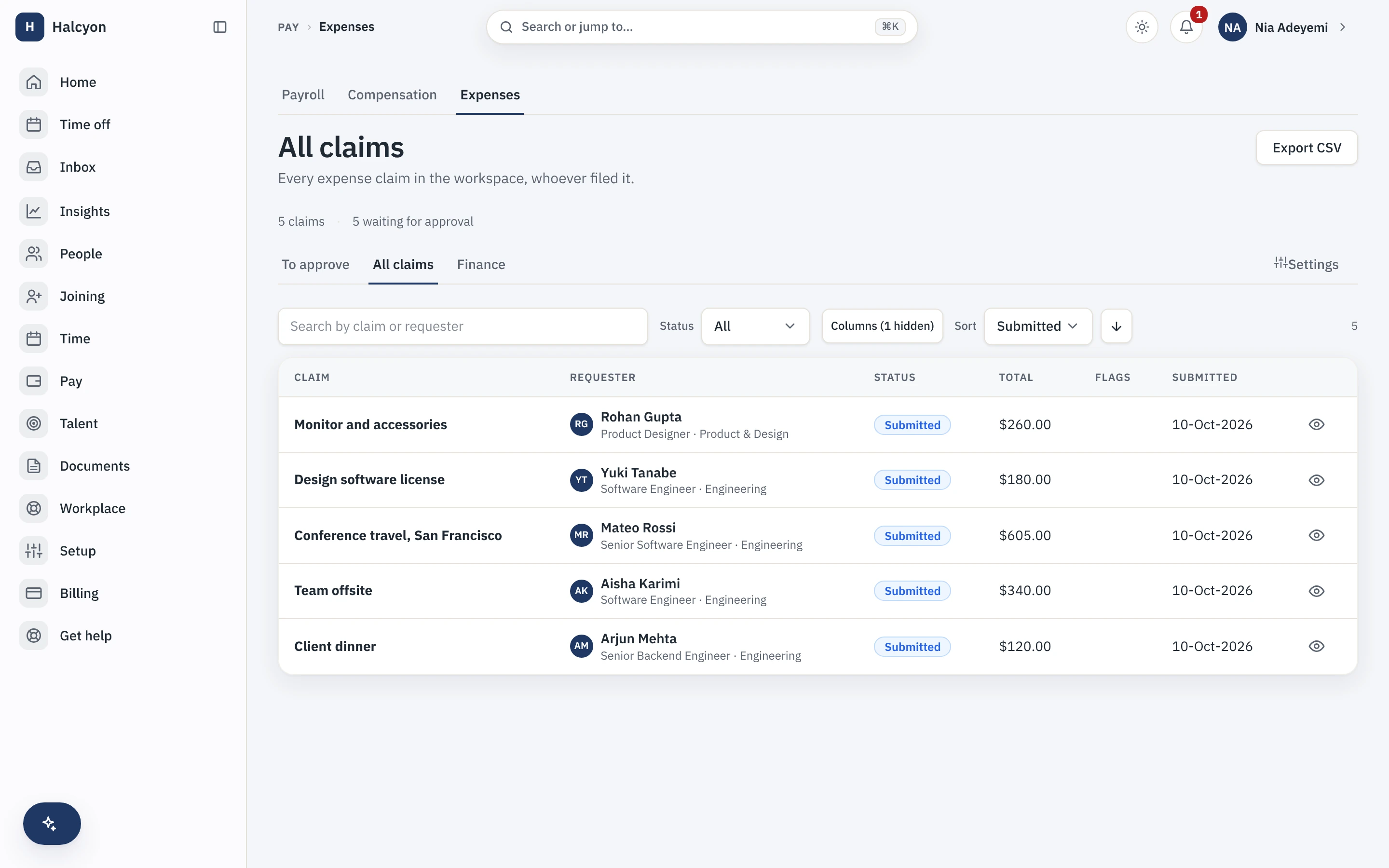
Expenses & Travel in the product
A real capture from the demo workspace, a global company with a team across the US, the UK and India. Not a mockup.
What Expenses & Travel does not do
Every module here publishes its non-goals, from its own specification. Boundaries you learn before buying are features; boundaries you learn after are refunds.
5 published for Expenses & Travel
-
It does not book travel.
Travel here means travel-category expenses and mileage; itineraries and vendor integrations are out.
-
It is not a corporate card programme.
It issues no cards, reads no card feeds and reconciles no bank statements.
-
It moves no money.
Disbursements, reimbursements and repayments are recorded with a mandatory reference.
-
It ships no per-diem engine and no jurisdiction’s expense policy.
A per-diem is expressible as a category with a cap.
-
It does not read your receipts for you.
There is no OCR, no currency conversion engine, and contractor expense claims are out in v1.
How it runs in practice
An employee photographs a receipt and adds a mileage line whose amount derives from the rate in force on that date, never from a figure they type. The claim routes to their approver with any soft-cap violation flagged inline, and a category configured as a hard cap refuses the submission outright. On approval the claim nets off any outstanding advance, and the reimbursement is recorded with its payment reference.
Where Expenses & Travel meets your other modules
Each of these is a boundary both specifications state, so it reads the same from either side. Every one is optional: with the other module off, the capability is absent rather than broken.
- Payroll
Approved reimbursements are one of the inputs the payroll pack compiles.
Expenses & Travel questions
Who is Expenses & Travel for?
Companies where expense claims currently arrive as photographs in a chat thread and get reimbursed on somebody’s memory of who approved what. The buyer is usually finance. It earns its place once you have enough claims that the approval trail matters, or once you are paying mileage and want the rate applied from a dated table rather than typed in by whoever is claiming. If your team files three claims a quarter, the core’s document store and a bank transfer are honestly enough.
What do I need in place before I can turn Expenses & Travel on, and how much setup is it?
Nothing to turn on: every module is included on every plan, the free one included, so a workspace already has this from the day it is created, on Free as much as on Growth. Then the configuration is your policy expressed as data: expense categories, whether each cap is a soft flag or a hard refusal, receipt thresholds where you want one, mileage rate tables with the dates they take effect, whether advances are available, and which reminders are on. The defaults are deliberately permissive, with caps soft, receipts required only where you set a threshold, advances off and reminders off, so the module is usable before you have written a policy. Approvals bind to the same workflow engine your other approvals already use. The work is deciding the policy, not configuring it.
What does Expenses & Travel explicitly not do?
It does not book travel. Travel here means travel-category expenses and mileage; itineraries, bookings and vendor integrations are out. It is not a corporate card programme: it issues no cards, reads no card feeds and reconciles no bank statements. It moves no money, so disbursements, reimbursements and repayments are recorded with a mandatory reference rather than paid from inside Capstan. It ships no per-diem engine and no jurisdiction’s expense policy, though a per diem is expressible as a category with a cap. It does not read your receipts for you: there is no OCR and no currency conversion engine. And contractor expense claims are out of scope in this version.
How does Expenses & Travel fit with the core and the other modules?
Claims and advances are ordinary subjects of the core workflow engine, so they route through the same approval machinery, notifications and audit trail as a leave request, and a receipt is a document in the core document store rather than an attachment living somewhere separate. Reporting registers with the core report registry, so expense reports are scoped by the same permissions as everything else. It requires no other module. Where Payroll is enabled, approved reimbursements are one of the inputs compiled for your payroll partner if you settle them through payroll rather than separately. If you use outbound webhooks, which are core on every plan, this module emits an event when a claim is submitted and when an approved claim is reimbursed.
What happens if I turn Expenses & Travel off?
Claims, advances, categories, mileage rate tables and the expense reports stop being reachable, and because the module is part of your plan there is no separate charge to stop. Your expense data is not deleted: it is retained on a schedule and restored if you re-enable within that window, and a full workspace export includes module data whether or not the module is currently enabled. Receipts remain documents in the core document store under the same visibility rules as any other document. Nothing in the free core changes.
Does Expenses & Travel add to my bill?
No. It is included in your plan at no extra charge and never raises its own line, whatever your headcount. It is not billed per claim, per approval, per receipt or per amount reimbursed, and nothing about your bill moves with the value of what you reimburse. The only charge on your account is the plan per-seat rate on your employees past the first twenty, and every figure is on the pricing page.
Expenses & Travel is included on every plan, the free one included.