
Included on every plan
Contractor management and onboarding, inside your HRIS
The Contractor Management module onboards contractors globally: contracts, compliance documents, and the right tax form resolved from the contractor’s country and the paying entity. It then takes their invoices, approves them through your chain and records each payment against them. It is included on every plan at no extra charge, and it keeps an internal meter of active contractors while inactive ones are not counted.
- Counted on
- per active contractor, monthly. Counted on its own unit, and only on the units active that month, so everyone else is free.
- Published limits
- 6, taken from the module specification and printed in full below.
- Documented seams
- 4, to 4 other modules . Each one is optional, and absent rather than broken when the other is off.
- In the catalogue
- What people are paid, and what work costs
- How you get it
- It is already included, on every plan and the free one too, at no extra charge. There is nothing to buy and nothing to switch on module by module. What every plan includes, and what is true of every module.
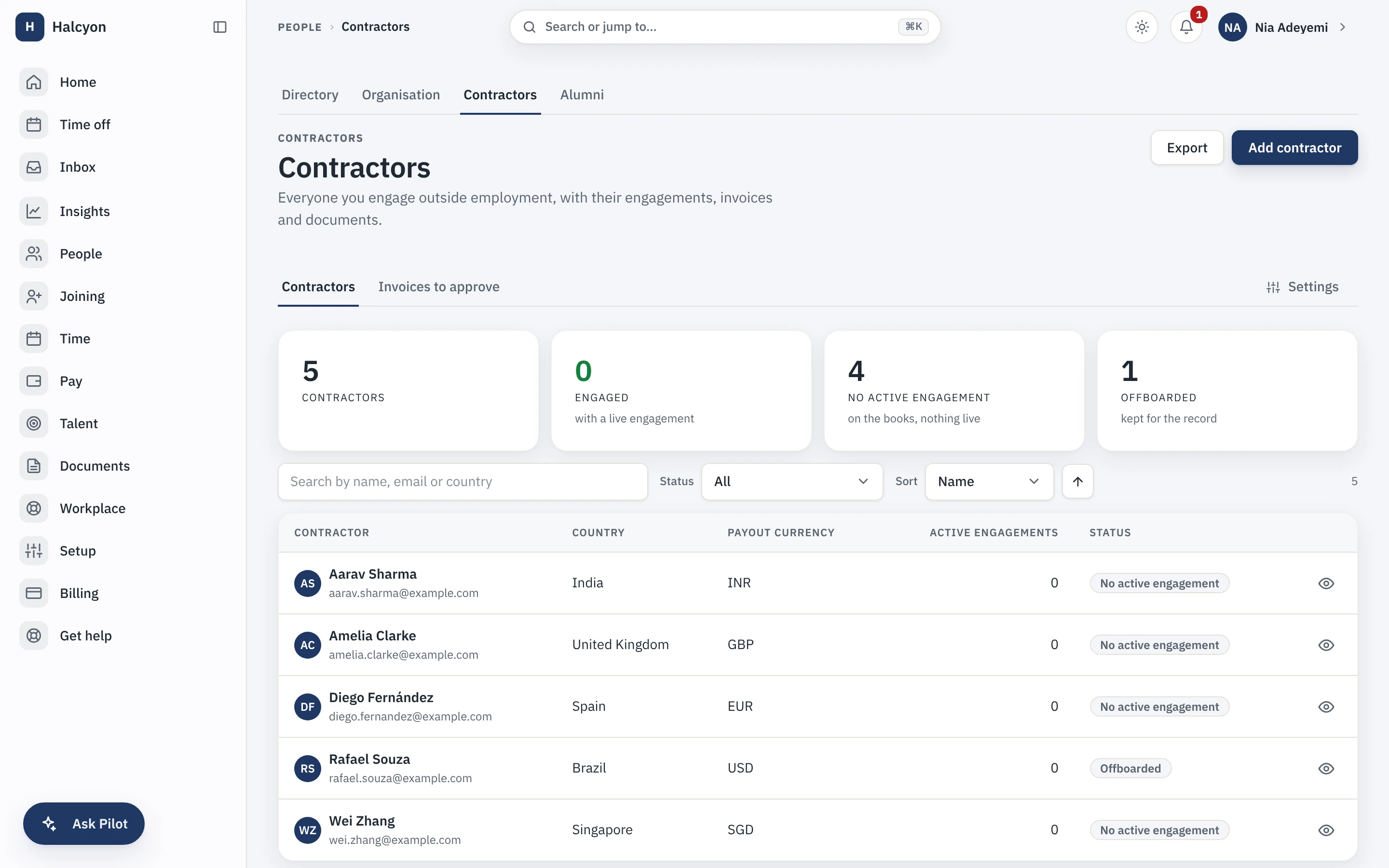
Contractor Management in the product
A real capture from the demo workspace, a global company with a team across the US, the UK and India. Not a mockup.
What Contractor Management does not do
Every module here publishes its non-goals, from its own specification. Boundaries you learn before buying are features; boundaries you learn after are refunds.
6 published for Contractor Management
-
Capstan never moves your money.
You pay a contractor out of band, by bank transfer, UPI, cheque or anything else, and record the payment with its mandatory reference. Any payout rail is off by default, and even switched on it is your provider, not Capstan, that moves the money, so no client funds ever sit in it.
-
It collects tax forms, W-8 and W-9 and their local equivalents, and it never files them.
A contractor self-files.
-
It does not decide worker classification for you.
The optional questionnaire produces an informational risk indication, labelled in the product as not legal advice, and it never blocks an action by itself.
-
It does not run employer-of-record employment.
If you need an EOR, you need an EOR, not this module.
-
It does not turn a contractor into an employee.
A contractor is a distinct entity with its own engagement, deliberately outside employee headcount, so enabling this module never inflates your seat count.
-
Country packs are your workspace’s own contractor tax content per jurisdiction: a drafting aid your accountant edits before submitting, not tax advice.
How it runs in practice
A company with contractors in three countries onboards each one through the contractor portal, has the right tax form resolved automatically rather than from tribal knowledge, and approves submitted invoices through the standard approval chain. Each payment is recorded with its external reference, and the contractor sees payment status and history against their own invoices without asking anyone.
Where Contractor Management meets your other modules
Each of these is a boundary both specifications state, so it reads the same from either side. Every one is optional: with the other module off, the capability is absent rather than broken.
- Payroll
Contractor invoices and payouts belong to Contractor Management, permanently, and never to Payroll.
- Timesheets & Projects
Contractor time is logged the same way employee time is.
- Asset Management
An asset can be issued against a contractor engagement rather than a person.
- Helpdesk
A ticket can start in the contractor portal as well as in self-service.
Contractor Management questions
Who is Contractor Management for?
Companies that engage independent contractors directly, in one country or several, and are currently running that relationship out of email and a spreadsheet: contracts in a folder, tax forms chased by hand, invoices approved in a mail thread, payments reconciled from memory. The buyer is usually the finance or operations person who owns that mess. It is not for companies that hire abroad through an employer of record, because Capstan is not one, and it is not for managing your own employees, who live in the free core whether or not this module is on.
What do I need in place before I can turn Contractor Management on, and how much setup is it?
Nothing to turn on: every module is included on every plan, the free one included, so a workspace already has this from the day it is created, on Free as much as on Growth. After that, most of the setup is contractor-side rather than company-side. You point engagements at the paying legal entities you already hold in the core, bind invoice approval to a workflow chain of the same kind your leave and expense approvals already use, and fill in a country pack for each jurisdiction you engage in if you want invoice-line suggestions (a draft pack is created automatically the first time you add a contractor there, and you activate it once its values are ready). Contractors then onboard themselves through their own portal, which is where most of the data entry actually happens. There is no importer for contractors, so an existing roster is typed in once.
What does Contractor Management explicitly not do?
It moves no money, ever. You pay a contractor out of band, by bank transfer, UPI, cheque or anything else, and record the payment with its mandatory reference; any payout rail is off by default, and even switched on it is your provider, not Capstan, that moves the money, so no client funds sit in it. It collects tax forms, W-8 and W-9 and their local equivalents, and never files them, because a contractor self-files. It does not decide worker classification for you: the optional questionnaire produces an informational risk indication, labelled in the product as not legal advice, and it never blocks an action by itself. It does not run employer-of-record employment. It does not turn a contractor into an employee, because a contractor is a distinct entity with its own engagement, deliberately outside employee headcount. And the country packs are your workspace’s own content, a drafting aid your accountant edits before submitting rather than tax advice.
How does Contractor Management fit with the core and the other modules?
It builds on the core rather than beside it. Contractor engagements use the legal entities, approval workflow engine, document store and notification ladder that the free core already runs, so an invoice approval routes the same way a leave request does. It is also the module other modules look for. Asset Management can issue a laptop against a contractor engagement while this is enabled and simply does not offer that option when it is not. Timesheets and Projects can log contractor time, and Helpdesk can accept contractors as requesters, both only while this is on. None of those modules breaks when it is off: the capability is absent rather than broken. Payroll never touches contractors at all, because contractor invoicing and payouts stay here permanently.
What is a country pack, and how much do I have to trust it?
A country pack is your workspace’s own tax content for one jurisdiction: the contractor withholding rules, their threshold bands, the tax lines that belong on an invoice there, and the documents you require. You own it. A draft pack appears automatically the first time you add a contractor or engagement in a country, so it turns up exactly where you need it; you fill in that jurisdiction’s values and activate it when they are ready. Only an active pack suggests anything: a draft or an unconfigured country suggests nothing rather than guessing, so the app never withholds on values you have not set. At invoice time the active pack suggests editable draft lines, matched to the engagement’s jurisdiction, and every suggested line records the pack it came from. The pack is the default and your accountant is the authority: every suggested line is editable before submission, and re-applying a pack never touches a line a person wrote. Changing a rate is an edit you make, not a release you wait for. India ships with starter values to build on; every other country you fill in yourself, which is the point, because the people who know a jurisdiction enter its values rather than trusting content we authored for a country we do not operate in. Treat a pack as a drafting aid your accountant signs off, never as tax advice.
Do contractors add to my bill?
No. This module is included in your plan at no extra charge, so contractors add nothing to what you pay however many you engage. The module keeps an internal meter of active contractors, but it never produces an invoice line: the only charge on your account is the plan per-seat rate on your employees past the first twenty, and contractors are not employees and never enter that count.
Do contractors count toward my 20 free people?
No. The free plan cap counts active employees. A contractor is a distinct entity in Capstan, never an employment, so a contractor never enters employee headcount, never consumes one of the twenty free places, and never appears in the per-employee seat count a paid plan bills on. The module bills on active contractors instead, on its own unit.
What happens if I turn Contractor Management off?
The contractor surfaces disappear from the app: the contractor list, the portal, invoicing and the payment records stop being reachable, and any option other modules offered because this one was on goes away with it. Because every module is included on every plan at no extra charge, none of this moves your bill: the plan is one price whichever modules a workspace is using. Your contractor data is not deleted. It is retained on a schedule, and re-enabling within that window brings it back as it was. A full workspace export includes module data whether or not the module is currently enabled, so switching it off never puts your contractor records out of your reach. Nothing in the free core changes.
Contractor Management is included on every plan, the free one included.