
Included on every plan
Compensation reviews and equity vesting your employees can actually see
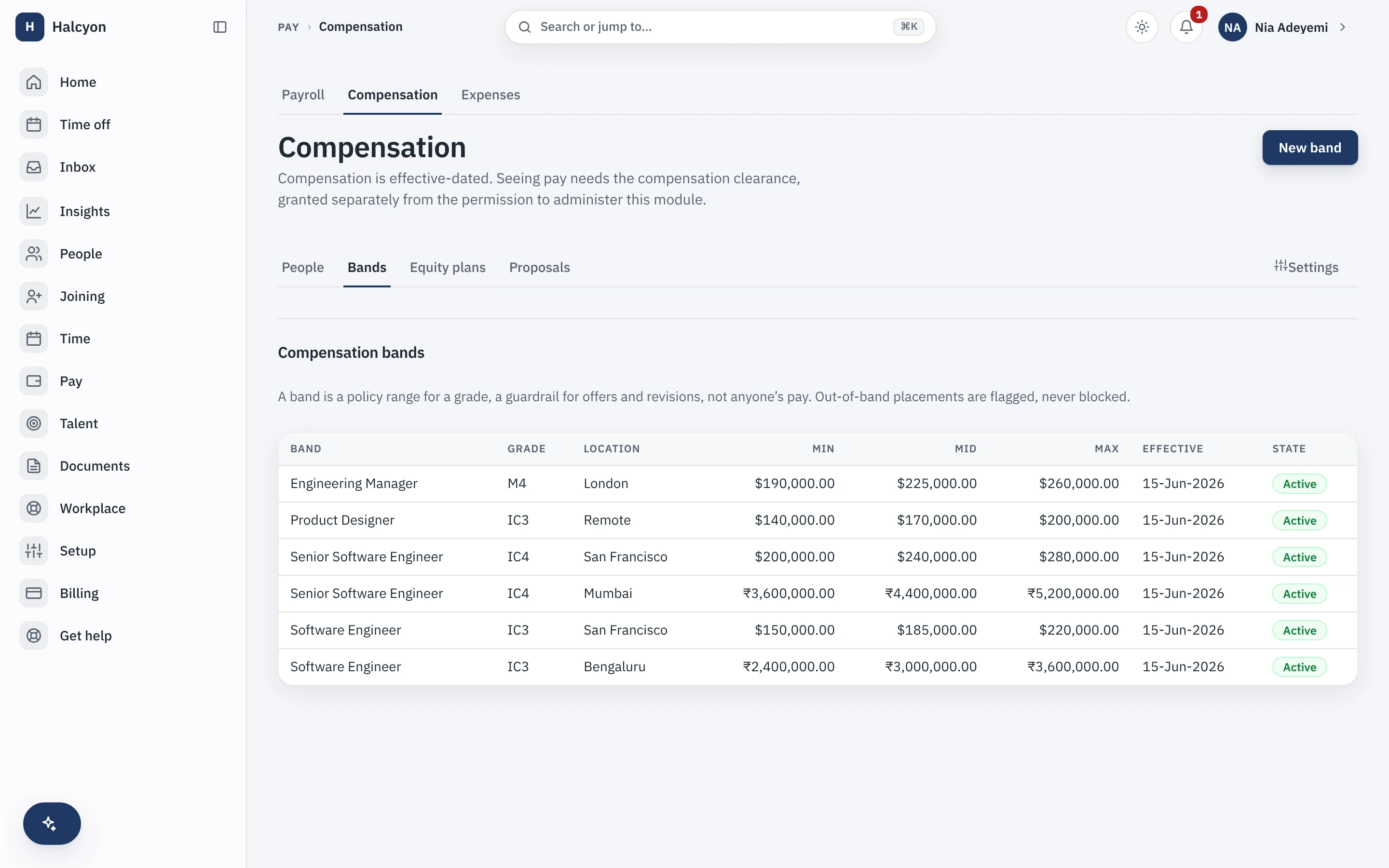
The Compensation & Equity module holds compensation as effective-dated, encrypted records with bands by grade and location, runs revision proposals through an approval chain and generates the letter on approval, and tracks equity plans, grants and vesting, ESOPs included, that every employee can see in self-service. It is included on every plan at no extra charge.
- Counted on
- per employee, monthly.
- Published limits
- 5, taken from the module specification and printed in full below.
- Documented seams
- 3, to 3 other modules . Each one is optional, and absent rather than broken when the other is off.
- In the catalogue
- What people are paid, and what work costs
- How you get it
- It is already included, on every plan and the free one too, at no extra charge. There is nothing to buy and nothing to switch on module by module. What every plan includes, and what is true of every module.
Compensation & Equity in the product
A real capture from the demo workspace, a global company with a team across the US, the UK and India. Not a mockup.
What Compensation & Equity does not do
Every module here publishes its non-goals, from its own specification. Boundaries you learn before buying are features; boundaries you learn after are refunds.
5 published for Compensation & Equity
-
It is not a cap-table product and does not replace your cap-table source of truth; grants reference the legal register, they do not become it.
-
It shows units, not value.
There is no valuation display, no tax advice and no perquisite valuation.
-
It computes no pay.
Compensation components and variable-pay targets are recorded as structured data for payroll inputs; nothing is calculated into pay here.
-
It moves no money on an option exercise.
Exercise, lapse and cancellation are recorded events.
-
Module access is not permission to see salaries.
Seeing an amount needs compensation clearance, administering the module is a separate capability, and holding one never grants the other.
How it runs in practice
A revision proposal shows the person’s band position and history before anyone approves it, and an out-of-band placement is flagged with a reason rather than blocked. Approval generates the revision letter and files it automatically, and the new record is effective-dated rather than overwriting the old one. Meanwhile every employee sees their own grants, vested and unvested units and next vest date, which ends the quarterly "how much have I vested?" email to the founder.
Where Compensation & Equity meets your other modules
Each of these is a boundary both specifications state, so it reads the same from either side. Every one is optional: with the other module off, the capability is absent rather than broken.
- Payroll
Compensation components are recorded as structured payroll inputs, not as computed pay.
- Performance & OKR
A rating is readable for a compensation process; nothing in either module writes a raise.
- Advanced Analytics
A joined report inherits compensation bucketing for anyone without compensation clearance.
Compensation & Equity questions
Who is Compensation & Equity for?
Companies where compensation currently lives in a spreadsheet on a founder’s or finance lead’s machine, and where the quarterly "how much have I vested?" question arrives by email. The buyer is usually finance or the founder rather than HR. It is worth having once you have more than a handful of grades, more than one location paying different bands, or an ESOP pool with a vesting schedule someone has to track. A five-person company with one pay band and no equity does not need it.
Can employees see their vesting without asking HR?
Yes, that is the point of the module. Each person sees their own grants, their vesting schedule, their vested and unvested units and their next vest date in self-service, without a request and without anyone assembling a statement. It is shown in units rather than a valuation, because a valuation is a number we would be making up. Nobody sees anybody else’s position: seeing an amount requires compensation clearance, which is a separate permission from being able to administer the module.
What do I need in place before I can turn Compensation & Equity on, and how much setup is it?
Nothing to turn on: every module is included on every plan, the free one included, so a workspace already has this from the day it is created, on Free as much as on Growth. Then the setup is genuinely front-loaded, more than most modules here. You define your compensation component types (fixed, allowance, variable target), your bands by grade or designation and location with their own effective dates and currency, your revision approval chain on the core workflow engine, and your revision and grant letter templates. Then you load the current compensation record for each person, which has no importer and is entered by hand, and your ESOP plans and grants. Grades and designations have to exist in the core org structure first, because bands hang off them. Expect this to be a project rather than an afternoon.
What does Compensation & Equity explicitly not do?
It is not a cap-table product and does not replace your cap-table source of truth: grants reference the legal register rather than becoming it. It shows units, not value, so there is no valuation display, no tax advice and no perquisite valuation. It computes no pay: components and variable-pay targets are recorded as structured data that becomes payroll input, and nothing is calculated into pay here. It moves no money on an option exercise; exercise, lapse and cancellation are recorded events. And module access is not permission to see salaries: seeing an amount needs compensation clearance, administering the module is a separate capability, and holding one never grants the other.
How does Compensation & Equity fit with the core and the other modules?
It rests on the core’s field-level security, which is what lets a salary be stored as an encrypted, effective-dated record that most of the workspace cannot read. Bands hang off the core’s grades, designations and locations, revision approvals run on the core workflow engine, and an approved revision generates and files its letter through the core letters machinery. A transfer recorded in the core can trigger a band re-evaluation. Downstream, compensation records are inputs the Payroll module compiles and hands to your payroll partner, which is the only place a number here turns into a payment, and it is your partner who computes that. Performance ratings can be read by someone with compensation clearance while they prepare a revision, and nothing automates the step from one to the other.
What happens if I turn Compensation & Equity off?
Compensation records, bands, revision workflows and the equity views stop being reachable, including the self-service vesting screen your employees use, and because the module is part of your plan there is no separate charge to stop. The data is not deleted: it is retained on a schedule, and re-enabling within that window restores it, including the full effective-dated history rather than only current values. A full workspace export includes module data whether or not the module is currently enabled, and sensitive values come out of that export decrypted under your own authority. Letters already generated and filed against a person remain documents in the core document store.
Compensation & Equity is included on every plan, the free one included.