
Included on every plan
Payroll inputs, compiled from your HRIS and handed to your payroll partner
The Payroll module compiles every payroll input Capstan already holds, attendance, leave, overtime, comp, expenses, prorations, into a clean, documented export for your payroll partner, then files the results back where your people, and former people, can always find them. Capstan computes no statutory payroll: it is the system of inputs and the system of record; your partner is the system of computation.
- Counted on
- per active payroll member, monthly. Counted on its own unit, and only on the units active that month, so everyone else is free.
- Published limits
- 5, taken from the module specification and printed in full below.
- Documented seams
- 4, to 4 other modules . Each one is optional, and absent rather than broken when the other is off.
- In the catalogue
- What people are paid, and what work costs
- How you get it
- It is already included, on every plan and the free one too, at no extra charge. There is nothing to buy and nothing to switch on module by module. What every plan includes, and what is true of every module.
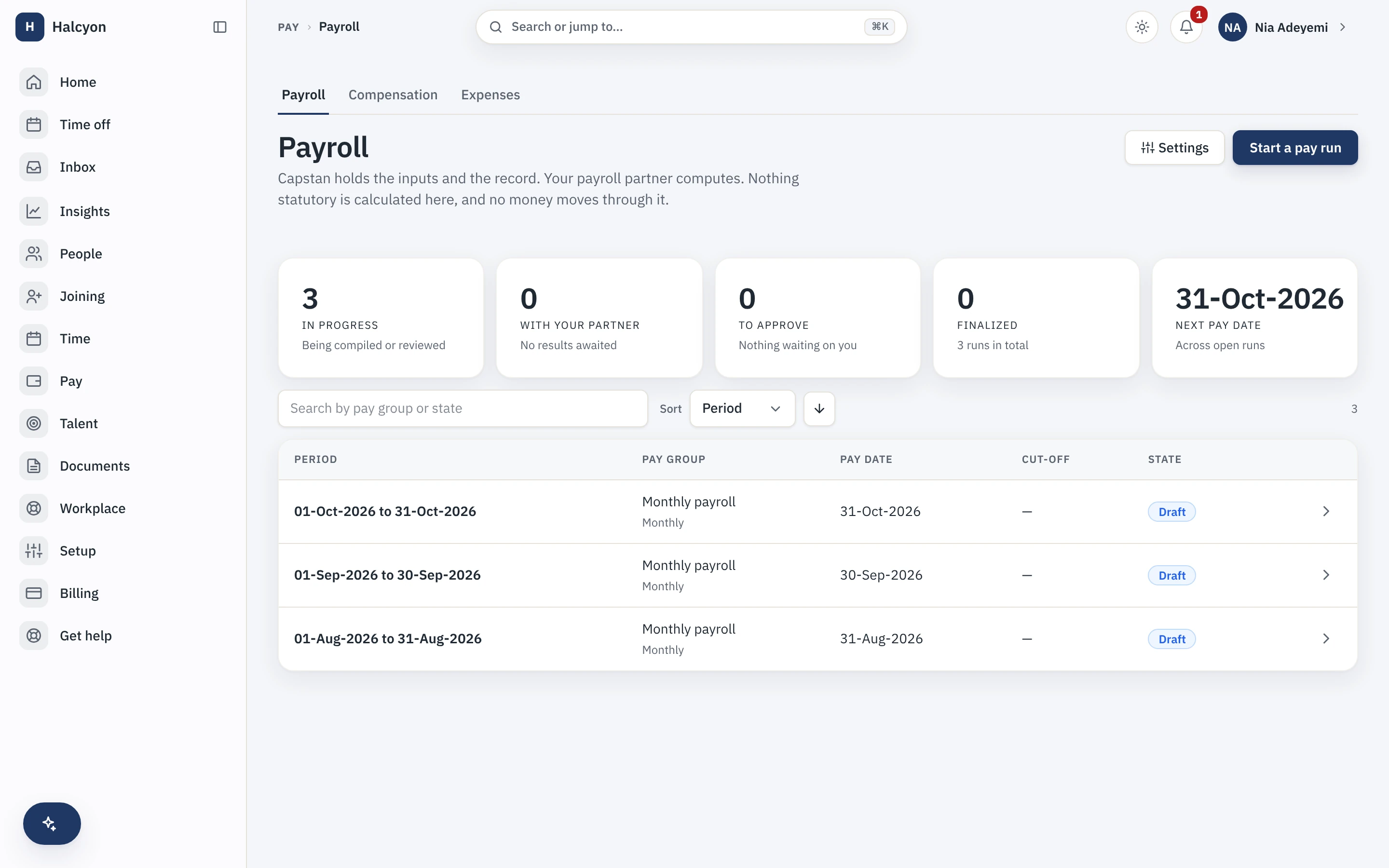
Payroll in the product
A real capture from the demo workspace, a global company with a team across the US, the UK and India. Not a mockup.
What Payroll does not do
Every module here publishes its non-goals, from its own specification. Boundaries you learn before buying are features; boundaries you learn after are refunds.
5 published for Payroll
-
It does not calculate gross-to-net, tax or statutory deductions, and it holds no rate, slab, bracket or formula anywhere.
Those numbers are your payroll partner’s, by design and permanently.
-
It does not file statutory returns, challans or forms.
It hands your partner a documented input export and files their computed results, payslips, letters, settlements, back into the record.
-
It is not a payroll engine you configure with tax rules.
The compliance maths lives with your partner; the inputs and the system of record live here.
-
It does not disburse salary and it generates no bank file.
Payment is recorded as a date and a reference, because money never moves through Capstan.
-
It does not pay contractors.
Contractor invoices and payouts belong to Contractor Management, permanently.
How it runs in practice
A Bengaluru startup’s attendance, approved leave, one-off bonuses and expense reimbursements are already in Capstan. At cutoff the module compiles them into a documented input pack, with source provenance on every line and variance flags against last period for a human to read, and hands it to the company’s payroll partner. The returned payslips and results are reconciled member by member, refused by name rather than half-loaded if they do not match, and filed against each person with no re-keying between an HR tool and a payroll tool.
Where Payroll meets your other modules
Each of these is a boundary both specifications state, so it reads the same from either side. Every one is optional: with the other module off, the capability is absent rather than broken.
- Contractor Management
Contractor invoices and payouts belong to Contractor Management, permanently, and never to Payroll.
- Time & Attendance (Advanced)
Approved overtime becomes comp-off or a payroll input, never an amount either module computes.
- Expenses & Travel
Approved reimbursements are one of the inputs the payroll pack compiles.
- Compensation & Equity
Compensation components are recorded as structured payroll inputs, not as computed pay.
Payroll questions
Who is the Payroll module for?
Companies that already have a payroll partner, bureau or accountant computing their statutory pay, and are re-keying the inputs into a spreadsheet every month to get them there. The buyer is the person who assembles that spreadsheet: attendance, approved leave, overtime, one-off bonuses, expense reimbursements, joiners, leavers and prorations, collected from four places and typed into a fifth. It is not for a company that wants one vendor to compute and file its payroll. Capstan will never be that vendor, so if that is what you are shopping for, this module is the wrong shape and you should know now.
Does Capstan calculate my payroll?
No. Capstan compiles the inputs and holds the records; your payroll partner computes gross-to-net and statutory deductions. Capstan holds no statutory rate, slab, bracket or formula anywhere in the product, and that absence is asserted by a structural test rather than left to discipline. It is a permanent product decision under the partner-integration model, not a gap waiting to be filled, so no future release turns Capstan into a payroll engine.
What does Capstan hand my payroll partner?
A documented export, CSV and JSON on a versioned schema, of every input it already knows: attendance, leave, overtime, compensation changes, expenses and prorations, so nothing is re-keyed. Every input line carries its source provenance, meaning the module and record it came from, and variance flags against the previous period are surfaced for a human to read before the export is frozen. Prorations travel as date facts rather than computed amounts, because computing them would be doing the partner’s job. The partner returns the computed numbers, and Capstan files the payslips, letters and settlement documents against each person.
What do I need in place before I can turn Payroll on, and how much setup is it?
Nothing to turn on: every module is included on every plan, the free one included, so a workspace already has this from the day it is created, on Free as much as on Growth. Then the real setup: pay groups, meaning a name, a pay frequency, a pay-day rule and the org scope of who is in each one, and the membership of each group, which is end-dated rather than overwritten so a mid-year move is history rather than a correction. After that you agree the export format with your partner, because the export is a documented schema rather than a certified integration with a named vendor. The inputs themselves need no setup, since the module reads what the core and your other modules already hold. Expect the pay-group modelling to be the work, and expect to run one period in parallel with your existing spreadsheet before you trust it.
What does the Payroll module explicitly not do?
It does not calculate gross-to-net, tax or statutory deductions, and it holds no rate, slab, bracket or formula anywhere. It does not file statutory returns, challans or forms. It is not a payroll engine you configure with tax rules: the compliance arithmetic lives with your partner, the inputs and the system of record live here. It does not disburse salary and it generates no bank file, because money never moves through Capstan; a payment is recorded as a date and a reference. And it does not pay contractors: contractor invoices and payouts belong to Contractor Management, permanently.
How does Payroll fit with the core and the other modules?
It reads and never writes. Compilation snapshots the attendance fold, the leave ledger, compensation records under their existing encryption and clearance rules, expense settlement, and overtime outcomes from the advanced Time and Attendance module where that is enabled, and the source modules are never modified by the act of compiling from them. That read-only relationship is asserted structurally rather than left as an intention. The modules it reads from are optional: without them it compiles fewer input types, and none of them becomes a prerequisite. Payslips and letters land in the same document store as everything else, which is how a former employee reaches their own payslips through Alumni Access after their work address is switched off. Contractor payments are deliberately outside its reach.
Does Payroll add to my bill?
No. Payroll is included in your plan at no extra charge and never appears on an invoice, whatever your headcount. The module keeps an internal meter of active payroll members, distinct people in one of your pay groups in a given month, but that meter produces no charge: the only line on your account is the plan per-seat rate on your employees past the first twenty. That plan count and the free plan’s twenty-employee cap, which counts concurrently active employees, are separate rules that happen to share the number twenty.
What happens if I turn Payroll off?
Pay groups, pay runs, compilation, exports and the payroll reports stop being reachable, and because the module is part of your plan there is no separate charge to stop. Payroll records are not deleted: they are retained on a schedule with a long floor, because payslips and settlement documents are statutory-adjacent records rather than operational data you can throw away when a subscription ends. Re-enabling within the retention window brings the module’s data back as it was, and a full workspace export includes payroll data whether or not the module is currently enabled. Payslips and settlement letters are filed as documents in the core document store, under the same category and visibility machinery as every other document, rather than living only inside the module.
Payroll is included on every plan, the free one included.