
Included on every plan
An applicant tracking system that feeds your HRIS directly
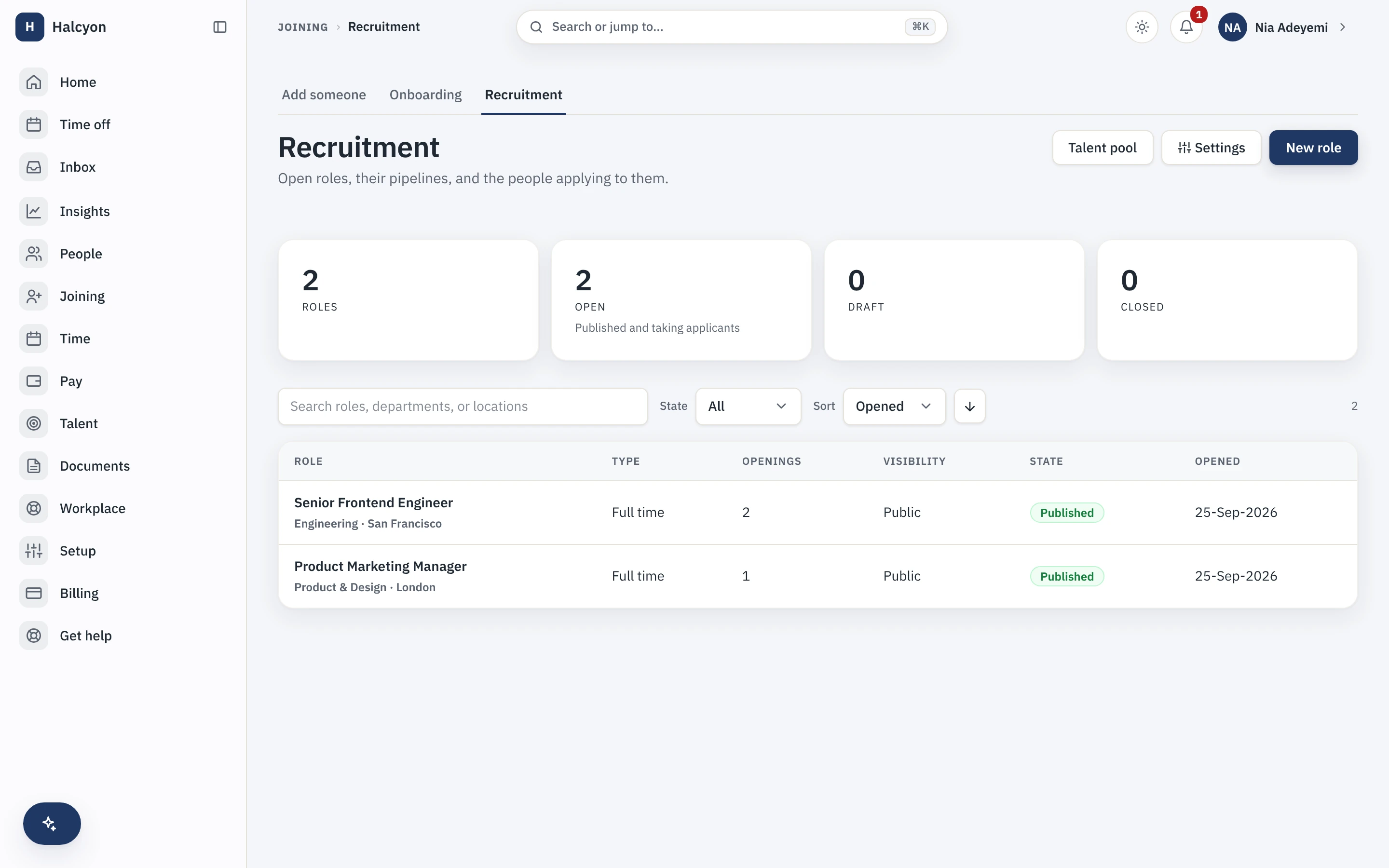
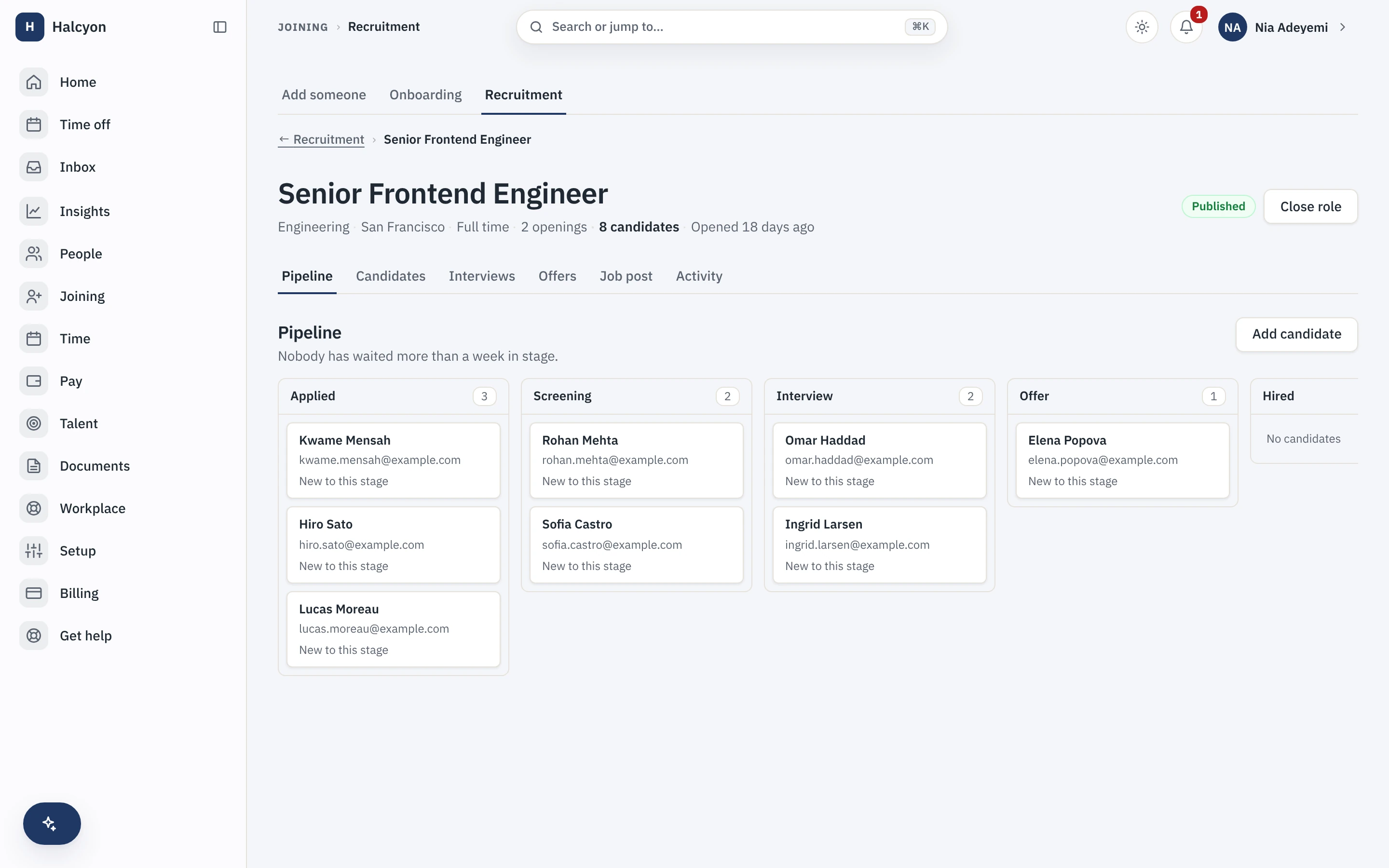
The Recruitment module runs requisitions, a public careers page on your own tenant slug, applications with résumé upload, interviews with per-interviewer scorecards and offers, and an accepted offer becomes an employee record in one step, with no re-keying. It is included on every plan at no extra charge, and it meters active recruiter seats internally rather than billing on your headcount.
- Counted on
- per active recruiter, monthly. Counted on its own unit, and only on the units active that month, so everyone else is free.
- Published limits
- 6, taken from the module specification and printed in full below.
- Documented seams
- None. It builds on the core and needs no other module switched on.
- In the catalogue
- Before someone is an employee
- How you get it
- It is already included, on every plan and the free one too, at no extra charge. There is nothing to buy and nothing to switch on module by module. What every plan includes, and what is true of every module.
Recruitment / ATS in the product
A real capture from the demo workspace, a global company with a team across the US, the UK and India. Not a mockup.
What Recruitment / ATS does not do
Every module here publishes its non-goals, from its own specification. Boundaries you learn before buying are features; boundaries you learn after are refunds.
6 published for Recruitment / ATS
-
No AI screens, scores or ranks candidates.
Software that evaluates humans in the dark is not a feature here, this is a documented product decision, not a roadmap gap.
-
Candidates are not accounts.
There is no candidate login: status travels on a signed, expiring link scoped to one application and revocable, and it never reveals another applicant.
-
It does not syndicate your jobs to job boards for you, and it runs no outbound sourcing sequences.
-
It does not run background checks.
There is a hook for the check you commission; the check itself is somebody else’s.
-
It is not an agency product.
Consultant and agency multi-client recruiting is deliberately out; internal hiring is what this ships for.
-
It does not parse résumés into fields, and it does not sync interviews to your calendar.
Both are recorded deferrals with stated triggers, not implied features.
How it runs in practice
A hiring manager moves a candidate from accepted offer to onboarding checklist in one step; the profile, documents and start-date workflows carry over because the conversion runs through the same pre-joining pipeline the core already uses. Candidates apply on the public careers page without an account, interviewers leave one immutable scorecard each, and only the recruiters holding a seat that month are counted, whatever the headcount.
Where Recruitment / ATS meets your other modules
Recruitment / ATS has no documented seam with another module. It builds on the core, like every module in the catalogue, and needs no other module switched on. See the other 13.
Recruitment / ATS questions
Who is the Recruitment module for?
Companies hiring for themselves, where the same small group runs requisitions, screens applications, schedules interviews and makes offers, and where the accepted offer currently gets re-typed into the HR system by hand. It is aimed at internal hiring rather than agency work: consultant and agency multi-client recruiting is deliberately out of scope, so a staffing firm running pipelines for several clients is not who this was built for. If you hire two people a year, the core’s onboarding is probably enough on its own.
Does the recruitment module use AI to rank candidates?
No. No AI evaluates people anywhere in Capstan. Nothing screens, scores, ranks or shortlists a candidate, and no model reads a résumé to produce a number. What is automated is structure: pipeline stages, transitions, reminders and the offer flow. Judgment about humans stays on human scorecards, one per interviewer and immutable once submitted. This is a documented product decision rather than a feature we have not built yet.
Does Recruitment add to my bill?
No. It is included in your plan at no extra charge and raises no invoice line, however many people you hire. The module keeps an internal meter of active recruiter seats, people holding the recruiter capability in a given month, but that meter is never charged: interviewers leaving feedback and hiring managers reviewing candidates hold no seat either way. The only charge on your account is the plan per-seat rate on your employees past the first twenty.
What do I need in place before I can turn Recruitment on, and how much setup is it?
Nothing to turn on: every module is included on every plan, the free one included, so a workspace already has this from the day it is created, on Free as much as on Growth. Then the setup leans on things the core already holds: requisitions bind to your existing departments, designations and work locations, requisition and offer approvals bind to the same workflow engine your other approvals use, and offer letters come from the letter templates machinery rather than a separate template system. What is genuinely new is your pipeline stages, your scorecard questions, and the content of your public careers page, which publishes on your own workspace slug. Budget the time for writing the scorecard, not for wiring the tool.
What does the Recruitment module explicitly not do?
No AI screens, scores or ranks candidates. Candidates are not accounts: there is no candidate login, and status travels on a signed, expiring link scoped to one application and revocable, which never reveals another applicant. It does not syndicate your jobs to job boards for you and it runs no outbound sourcing sequences. It does not run background checks; there is a hook for a check you commission, and the check itself is somebody else’s. It is not an agency product. And it does not parse résumés into fields or sync interviews to your calendar: both are recorded deferrals with stated triggers rather than implied features.
How does Recruitment fit with the core and the other modules?
The decisive join is at the end of the pipeline: an accepted offer converts into the core’s pre-joining pipeline in one step, so the person, their documents and their start-date workflows carry over with no re-entry, and from that moment they are an ordinary core employee record rather than something owned by this module. Upstream, requisitions bind to the core’s department, designation and location masters, approvals run on the core workflow engine, and offer letters use the core letter templates. It does not depend on any other module. If you use outbound webhooks, which are core and on every plan, this module is where most of the available events come from: stage changes, rejections, offers extended and decided, and a candidate converted into an employee.
What happens if I turn Recruitment off?
The requisition, pipeline, interview, scorecard and offer surfaces stop being reachable, and because the module is part of your plan there is no separate charge to stop. People you already hired through it stay exactly where they are: conversion runs through the core’s own pre-joining pipeline, so a hire is a core employee record and does not belong to the module. Your recruitment data is not deleted; it is retained on a schedule, and re-enabling within that window restores it. A full workspace export includes module data whether or not the module is currently enabled, so candidate and offer history stays within your reach either way.
Recruitment / ATS is included on every plan, the free one included.